
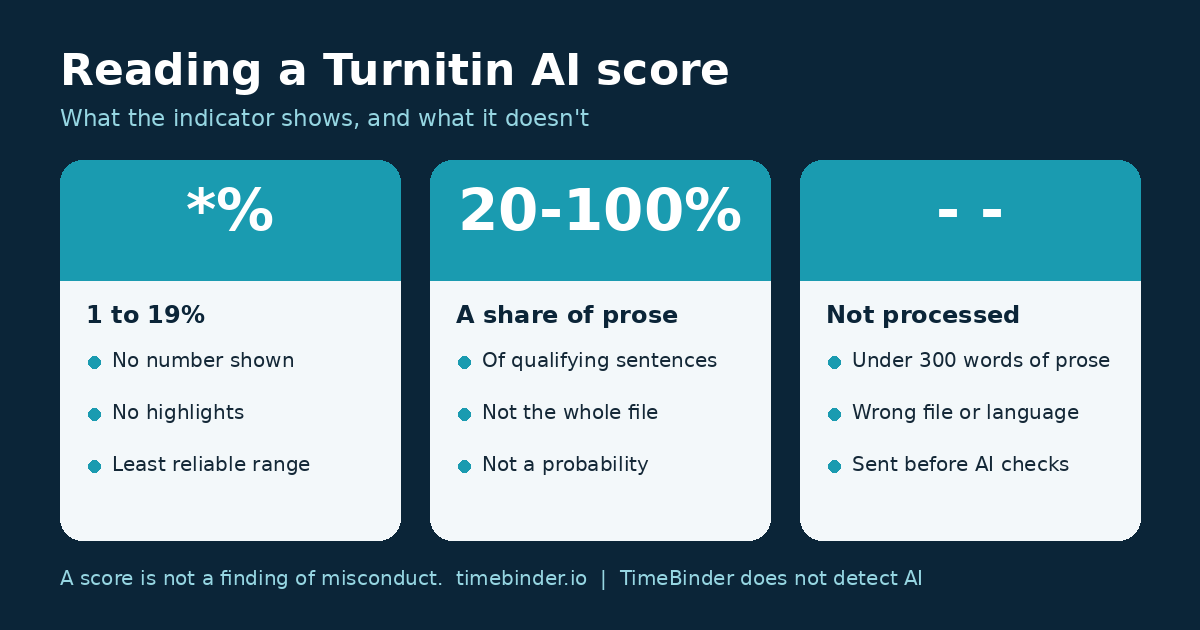
Short answer: Turnitin’s AI percentage is the share of qualifying prose sentences that its model scored as likely AI-generated, or AI-generated and then changed by a paraphraser or “humanizer”. It is not the chance that you used AI and not a share of the whole file. *% means the model flagged something under 20%, so Turnitin shows no number and no highlights. Turnitin itself says the score should not be the sole basis for action against a student.
TimeBinder adds a layer of protection against AI and human fraud and disputes. It does not detect AI. A TimeBind is a dated, checkable record that an exact file existed no later than a recorded time and still matches; the fingerprint is made in your browser and the file stays on your device.
Last checked 16 November 2026 against Turnitin’s own guides. General information, not legal advice. Turnitin changes its product often; check the current guide your institution links to.
Table of contents
- The short answer
- What the percentage actually counts
- The five things you might see
- The highlights, and why they don’t match the number
- What Turnitin doesn’t count
- Why the same text can score differently
- What the score does not mean
- Reading the report like a lawyer would
- An illustrative example
- What to keep from now on
- Frequently asked questions
- Sources checked
The short answer
If you have been shown a Turnitin AI Writing Report, there are three things to read: the overall percentage (or an asterisk, or a grey dash), the highlights in the text, and the date the report was made. The percentage is a statement about one model’s view of some of your sentences on one day. It says nothing about who wrote the work, how you used any tool, or whether your course rules were broken. That question is for a person, under your institution’s policy.
This page is about reading the report itself. For why different detectors disagree, see why two AI detectors give different scores. For how schools and employers use detectors, see AI detectors in universities and workplaces.
What the percentage actually counts
Turnitin’s capabilities FAQ describes the method for English submissions. The model gives each sentence a score between 0 and 1, reading it in the context of the text around it. Sentences above a threshold are labelled AI; the rest are labelled human. The document score is the percentage of evaluated sentences above the threshold.
- It counts sentences, not words or pages. Only “qualifying text” is evaluated: prose sentences in paragraphs of long-form writing, such as an essay, article or dissertation.
- It is not a share of your whole file. Turnitin says the percentage “is not necessarily the percentage of the entire submission”, because lists, tables, references and similar text are left out first.
- It is separate from the Similarity score. Similarity measures text that matches other sources. The AI percentage does not affect it, and the two are reported separately.
- It is tuned to miss rather than over-flag. Turnitin says it aims to keep false positives under 1% for documents with over 20% AI writing, and accepts it may miss some AI text as a result. Its own example: a document scored 50% “could contain as much as 65% AI writing”. The flip side is that 1 in 100 fully human documents can still be flagged at that target rate.
The five things you might see
Turnitin’s guide Using the AI Writing Report lists these states:
- 0%: no qualifying text was scored as likely AI.
- *% (an asterisk): something between 1% and 19% was flagged. Since July 2024, Turnitin shows no number and no highlights in that band, because its testing found a “higher incidence of false positives” there. Reports made before that change may still show a number below 20%. Turnitin’s help centre explains the asterisk the same way.
- 20% to 100%: the share of qualifying sentences scored as likely AI-generated or AI-modified, with highlights in the text.
- A grey dash (- -): the file was not processed for AI writing, for example because it has fewer than 300 words of qualifying prose, is in an unsupported language or file type, or was submitted before the feature was switched on.
- An error (!): processing failed. It is a technical result, not a finding.
A grey dash or an error is not a low score. It means there is no AI score for that file at all.
The highlights, and why they don’t match the number
In the current report, flagged sentences are highlighted in one colour (blue) under “AI-generated”. Turnitin says this category includes text that may have been AI-generated and then changed by an AI paraphraser, word spinner or bypasser tool, and that paraphrase and bypasser detection is only available for English submissions. Reports made under an earlier layout split this into two categories, “AI-generated only” and “AI-generated text that was AI-paraphrased” (shown in purple), so an older PDF may look different.
Turnitin notes that the percentage and the amount of highlighted text often look out of step. That is expected: the percentage is calculated only over qualifying sentences, while you see highlights scattered through a document that also contains headings, lists and quotations. Turnitin also says it is hard to tell exactly where human writing ends and AI writing begins in mixed text, and that in short documents of a few hundred words the result is “mostly all or nothing”, so a partly human passage can be flagged as a whole.
What Turnitin doesn’t count
From Turnitin’s file requirements and FAQ:
- At least 300 words and no more than 30,000 words of qualifying prose; file under 100 MB; .docx, .pdf, .txt or .rtf.
- Supported languages: English, Spanish, Japanese, Arabic, German, Dutch and Turkish. Other languages get no report.
- Text the model predicts is not a sentence is removed first: lists, headers, references, data tables, formulas and code. Bibliographies are excluded.
- Poetry, scripts, bullet points and annotated bibliographies are not reliably assessed.
- Spelling and grammar fixes from tools such as Grammarly were usually not flagged in Turnitin’s tests, but text from generative features (drafting, paraphrasing, summarising) likely will be.
AI detection is a licensed add-on. If your institution has not enabled it, your work is not processed for AI writing at all.
Why the same text can score differently
Turnitin’s model release notes record regular updates, including English model updates on 12 February 2026 and 14 October 2026. Each note says old reports are not recalculated: a stored report keeps the score from the model that made it, and a resubmission is scored by the current model. So the date of a report matters. Two reports of the same essay made months apart can legitimately differ, and neither is a correction of the other.
This is one reason to ask for the report PDF with its date, rather than relying on a number repeated in an email.
What the score does not mean
- It is not a finding of misconduct. Turnitin says it “does not make a determination of misconduct” and that the percentage “should not be used as the sole basis” for adverse action.
- It is not proof either way. 0% does not prove a text is human, and 60% does not prove it is machine-written. Turnitin lists repetitive text, text without much structural variation and paraphrase that does not develop new ideas as typical causes of false positives.
- It does not show authorship. Turnitin itself separates AI writing detection from its Authorship product, which looks at whether work was written by someone other than the student.
Some universities have turned the feature off. Vanderbilt University disabled Turnitin’s AI detector in August 2023, citing reliability and transparency, and worked out that even a 1% false-positive rate could have meant about 750 wrongly flagged papers out of the 75,000 it submitted in 2022.
Reading the report like a lawyer would
When a client brings me a document someone else has interpreted for them, the first questions are always the same: what exactly is this, who made it, when, and what does its maker say it can and cannot be used for? A Turnitin report answers the last question unusually clearly, because Turnitin’s own guidance says it is a starting point for a conversation and not a verdict. Hold the institution to that.
- Get the document. Students cannot see the AI indicator in Turnitin; only instructors and administrators can. Turnitin says instructors can download the AI report as a PDF and share it. Ask for that PDF, not a summary.
- Check the date and the state. Note the date, the percentage or *%, and whether the highlights fall on your own prose or on quotations, definitions or formulaic passages.
- Ask what else the decision rests on. Under Turnitin’s own guidance, a score alone should not decide the matter. Ask which policy applies and what the review process is.
- Know the access rights that apply where you are. They differ, so do not mix them up:
- United States: under FERPA (34 CFR 99.10), an eligible student can ask to inspect and review their education records, and the institution must comply within 45 days. Whether a particular report is an education record depends on whether the institution maintains it.
- European Union: under the GDPR, Article 15 gives a right of access to your personal data, generally answered within one month (Article 12(3)). Article 22 restricts decisions based solely on automated processing that significantly affect you, which fits Turnitin’s own position that a person must decide.
- United Kingdom: the UK GDPR and the Data Protection Act 2018 apply, not the EU text. The ICO’s subject access guidance explains how to ask.
- Bring your process. Drafts, notes, outlines, version history and sources carry more weight in a conversation than a second detector’s score. Do not shop for a better score elsewhere. Our calm reply template and the free AI accusation response pack builder help you set this out.
An illustrative example (not a real case)
A student submits a 2,600-word essay with a 30-item reference list, a data table and two long quotations. The report shows 24%. The reference list and table were never scored, so the 24% is a share of the remaining prose sentences, not of the whole file. Most highlights fall on the methods paragraph, which follows a template the course provided. The student asks for the PDF, notes the report date, and brings the outline, three earlier drafts saved over two weeks and the course template. The reviewer now has something to look at besides a number.
What to keep from now on
The hardest part of answering a score is showing how the work developed, after the fact. A habit makes it easy:
- Save each milestone as a separate file (outline, first draft, revised draft, final) rather than overwriting one document.
- Keep your notes, sources and any AI use your course permits, with a short note of what you used it for. Our free assignment AI-use checklist helps.
- Make a TimeBind of each milestone. It records that those exact files existed no later than the recorded times and still match. See draft history.
A TimeBind does not show who wrote the text, that it is original, or that no AI was used, and it does not override a detector score. It adds dated records of your own files, which a score cannot give you. For the bigger picture, read our guide why working drafts and timestamps matter more than AI detectors, and are AI detectors accurate?
Tools that can help
There is no affiliate link on this page. Our affiliate disclosure explains when we use them.
Frequently asked questions
-
What does *% mean on a Turnitin AI report?
It means the model flagged some qualifying text, but less than 20%. Turnitin does not show a number or highlight anything in that range because, by its own testing, false positives are more likely there. It is not a hidden high score.
-
Is a Turnitin AI score the chance that I used AI?
No. It is the share of qualifying prose sentences that Turnitin’s model scored above its threshold. A 40% score means the model labelled about 40% of the counted sentences as likely AI-generated or AI-modified, not that there is a 40% chance you used AI.
-
Can I see my own Turnitin AI score?
Not directly. Turnitin says the AI indicator and report are visible only to instructors and administrators. An instructor can download the AI report as a PDF and share it, so you can ask for a copy.
-
Why did my score change when the file was resubmitted?
Turnitin updates its model from time to time and says old reports are not recalculated. A resubmission is scored by the current model, so the same text can get a different result on a different date.
-
Does Grammarly trigger Turnitin’s AI score?
Turnitin says that in its tests, spelling, grammar and punctuation fixes from grammar checkers were usually not flagged. Text produced by generative features, such as drafting, paraphrasing or summarising, will likely be flagged.
-
Can TimeBinder show that I did not use AI?
No. TimeBinder does not detect AI and does not analyse your text. A TimeBind shows that an exact file existed no later than a recorded time and still matches. A series of them can show how your drafts developed, which is useful context, not proof of authorship.
Sources checked
- Turnitin Guides, Using the AI Writing Report (indicator states, file requirements, qualifying text), read 16 November 2026.
- Turnitin Guides, Turnitin’s AI writing detection capabilities FAQs (updated 3 November 2026: scoring method, false-positive target, visibility, Grammarly, licensing).
- Turnitin Guides, AI writing detection model release notes (July 2024 asterisk change; 2025 and 2026 model updates; reports not recalculated).
- Turnitin Help Center, Why is the AI Writing Detection report score showing as *%? (29 May 2026).
- Vanderbilt University, Guidance on AI Detection and Why We’re Disabling Turnitin’s AI Detector, 16 August 2023.
- US: 34 CFR 99.10, right to inspect and review education records. EU: Regulation (EU) 2016/679 (GDPR), Articles 12, 15 and 22. UK: ICO, a guide to subject access.
Keep your drafts dated while you write
- Open the app and sign in with email or Google.
- Add your draft files. They stay on your computer.
- Seal them and download your Proof of Time certificates.
Your first Pooled TimeBind is free, with no card required. After that, Pooled TimeBinds start from US$5, and an ASAP TimeBind is US$15. Open TimeBinder, or see plans and pricing.







