
Short answer: if two hashes made with the same algorithm differ, the two files’ bytes differ, even when they look the same on screen. The usual causes are line endings (Windows CRLF against Mac/Linux LF), a hidden byte order mark, a different text encoding, metadata an app wrote when the file was re-saved, a copy or download that did not finish, or comparing different algorithms (MD5, SHA-1, SHA-256). Capital letters, spaces or a line break in a pasted hash do not change the value; strip them before comparing.
TimeBinder adds a layer of protection against AI and human fraud and disputes. A TimeBind is a dated, checkable record that an exact file existed no later than a recorded time and still matches. The fingerprint is made in your browser and the file stays on your device, which is why the exact copy you keep matters so much.
Last checked 17 November 2026. General information, not legal or technical advice for a specific system.
Table of contents
The short answer
A file hash is a short value worked out from every byte of a file. Change one byte and the hash changes completely. It ignores the file name and where the file is stored. So “same file, different hash” almost always means “two files that show the same content but are stored as different bytes”. Your job is to find the hidden difference, or to find the copy that really is the original.
This guide is for that moment: you, a client or a colleague has two copies, a fingerprint check says no match, and nobody can see what changed. If you need the basics first, read what is a file hash?. To test two files right now, drop them into our free file comparison checker. Both are part of our free file-integrity tools.
A hash reads bytes, not what you see
SHA-256 is defined in the US federal standard FIPS 180-4, the Secure Hash Standard. It takes a message of any length and produces a 256-bit digest, normally written as 64 hexadecimal characters. Microsoft’s Get-FileHash documentation puts the practical consequence plainly: file names and extensions can change without changing the hash, but “changing even a single character in the contents of a file changes the hash value of the file.”
The catch is the word character. A text editor, a PDF viewer or a photo app shows you an interpretation of the bytes. Many different byte sequences can produce exactly the same screen. The hash only sees the bytes.
One sentence, four hashes
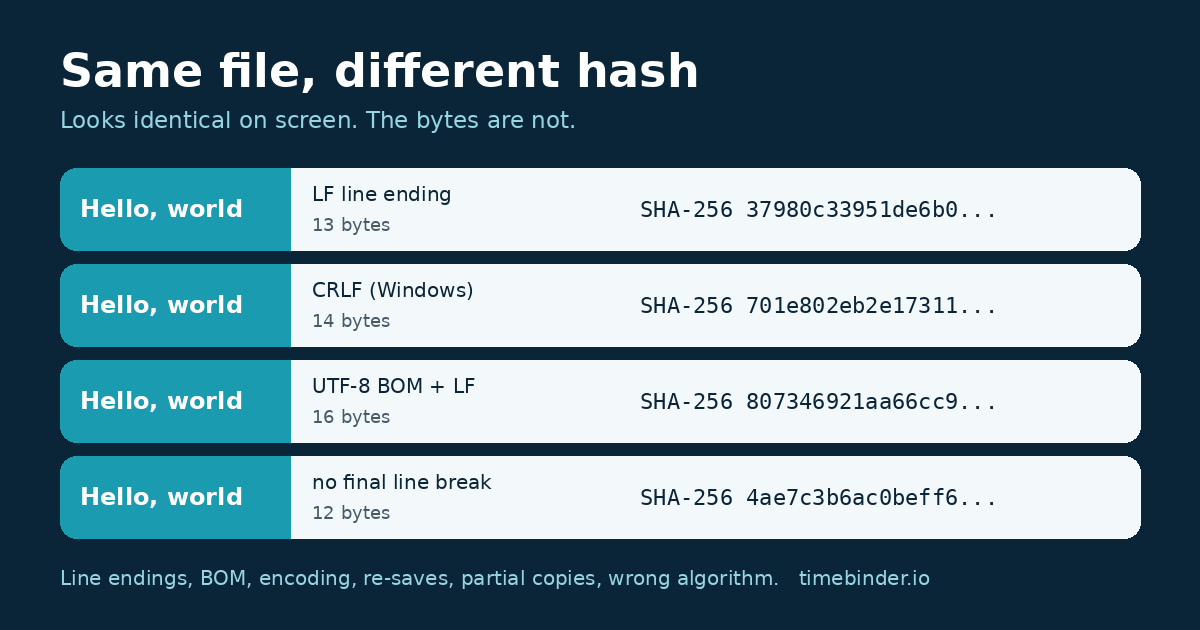
We hashed the text “Hello, world” saved four ways. On screen, all four look the same in most editors. The bytes and the SHA-256 hashes (first 16 characters shown) do not:
| What was saved | Bytes | SHA-256 starts |
|---|---|---|
| Hello, world + LF (Mac/Linux line ending) | 13 | 37980c33951de6b0... |
| Hello, world + CRLF (Windows line ending) | 14 | 701e802eb2e17311... |
| UTF-8 BOM + Hello, world + LF | 16 | 807346921aa66cc9... |
| Hello, world with no final line break | 12 | 4ae7c3b6ac0beff6... |
One extra invisible byte per line, or three bytes at the start, is enough. You can repeat this with our SHA-256 file hash checker using two small text files.
Seven common reasons copies don’t match
1. Line endings changed (CRLF and LF)
Windows ends a line of text with two characters, carriage return and line feed (CRLF). macOS and Linux use just a line feed (LF). The Pro Git book calls this “a subtle but incredibly annoying fact of cross-platform work” and notes that many Windows editors silently replace LF endings with CRLF. Git itself can convert line endings on checkout and commit when core.autocrlf is set, as the git-config documentation and gitattributes documentation describe. So the “same” script, CSV or contract text pulled from a repository on two computers can hash differently. Some email and file-transfer tools in text mode can do the same.
2. A byte order mark (BOM) was added or removed
A UTF-8 file may start with three invisible bytes, EF BB BF, called a byte order mark. Microsoft’s Using Byte Order Marks page says the BOM is optional for UTF-8, and the Unicode FAQ explains it is used as a signature. Because it is optional, some apps add it on save and others strip it. The text looks identical; the hash does not.
3. The text encoding changed
The same letters can be stored as different bytes. In UTF-8, plain English letters take one byte each; in UTF-16 they take two, as Microsoft’s encoding documentation sets out. Accented letters differ again between UTF-8 and older code pages such as Windows-1252. Opening a file and choosing a different encoding on “Save as” rewrites every byte.
4. An app re-saved the file and wrote new metadata
Word, Excel, PDF editors and photo apps store information inside the file as well as your content. Microsoft lists automatically updated properties for Office files, such as dates and word counts. Open a document, change nothing, press Save, and the app may still write a new modified time or save details inside the file. Exporting to PDF again, re-saving a JPEG, or rotating a photo in a viewer also rewrites the bytes. The page looks the same; the fingerprint changes.
5. The copy or download is incomplete
A download that stopped early, a sync that had not finished, or a file hashed while it was still being written gives a shorter file and a different hash. Compare the exact size in bytes first: if the sizes differ, the files differ, and the smaller one is often the problem.
6. A service converted or compressed the file
Some messaging apps, social sites and “optimise for web” settings resize or recompress images and video when you send or upload them, and some cloud editors convert documents to their own format on import. What comes back is a new file that looks like yours. For records you may need to check later, send and store files as attachments or in their original format where you can, and keep your own original.
7. You are comparing different algorithms, or the hash text is messy
MD5 (RFC 1321) gives 128 bits, SHA-1 gives 160 and SHA-256 gives 256, so their hex strings are 32, 40 and 64 characters long. They are different calculations and never match each other. On Windows, PowerShell’s Get-FileHash uses SHA-256 by default, while certutil -hashfile takes the algorithm as an option (see Microsoft’s certutil reference); always name it, for example certutil -hashfile report.pdf SHA256. Hex is not case-sensitive in meaning, so 3CBC and 3cbc are the same, but a stray space, line break, or a missing character copied from an email will make a by-eye comparison fail. Our guide to checking a SHA-256 checksum on Windows, Mac and Linux has the exact commands.
How to find which one it is
- Check the algorithm and length. 32, 40 or 64 hex characters? Make both hashes with the same algorithm, then compare ignoring case and spaces.
- Compare the sizes in bytes. Use the file’s Properties (Windows) or Get Info (Mac), not the rounded KB figure. Different sizes rule out a typo in the hash and point to causes 1 to 6.
- Look at the first and last bytes. On Mac or Linux,
xxd file | headshows a BOM asefbb bfat the start;file name.txtusually reports “with CRLF line terminators”. A size difference equal to the number of lines suggests line endings; a difference of 3 bytes suggests a BOM. - Ask where each copy came from. Downloaded, synced, exported, edited in a browser, sent through a chat app? The route usually explains the change.
- Test both in one place. The file comparison checker shows both SHA-256 fingerprints, names and sizes side by side in your browser.
A mismatch does not tell you who changed the file or whether anyone meant to. Most mismatches are innocent conversions. It tells you the bytes are different, and that is all. For a wider routine, see how to tell if a file has been changed.
Which copy is the original?
A hash cannot say which of two copies came first. That needs something outside the file: an earlier recorded fingerprint, a dated message with the attachment, a version-history entry, or a timestamp record. If you have a fingerprint recorded at an earlier date, the copy that still matches it is the one that existed at that date, byte for byte. The other copy was changed or converted afterwards, which may be harmless. Our walkthrough how to check a file still matches its fingerprint shows how to run that check.
Could two different files ever share a hash by accident? For SHA-256, no such pair has been publicly found; see what is a hash collision. Older MD5 and SHA-1 are a different story, which is one more reason to record SHA-256.
Keeping a copy that will still match
- Fingerprint the exact file you send or file, not a later “clean” export.
- Keep that copy read-only, in a folder you do not open and re-save from. Work on a duplicate.
- Store it next to the fingerprint record, with a note of the algorithm (SHA-256).
- When moving text files between Windows and Mac, or through Git, check the line-ending settings first.
- Prefer sending originals as attachments rather than through apps that recompress.
A TimeBind does not show who made a file, that it is original work, or that its content is true, and it does not stop anyone changing a copy. It gives you a dated, checkable record that the exact file existed no later than the recorded time, and lets anyone check later whether a copy still matches.
Frequently asked questions
-
Can two files look identical but have different hashes?
Yes. A hash is worked out from the file’s exact bytes, not from what you see on screen. Invisible differences such as Windows versus Unix line endings, a byte order mark at the start, a different text encoding or new metadata written on save all change the bytes, so they change the hash.
-
Does renaming a file change its SHA-256 hash?
No. The name, folder and file-system dates are stored outside the file’s contents, so renaming or moving a file does not change its hash. Opening and re-saving it in an app usually does, because the app writes the bytes again.
-
Why does my hash have capital letters when the published one is lowercase?
It is the same value. A SHA-256 hash is usually shown as 64 hexadecimal characters, and A to F mean the same as a to f. Windows PowerShell shows capitals; most Mac and Linux tools show lowercase. Compare them ignoring case and with no spaces or line breaks.
-
My MD5 does not match the SHA-256 on the website. Is the file corrupt?
Not necessarily. MD5, SHA-1 and SHA-256 are different algorithms and never give the same result. An MD5 hash is 32 hex characters, SHA-1 is 40 and SHA-256 is 64. Work out the same algorithm the publisher used before comparing.
-
If two files have the same SHA-256 hash, are they the same file?
For practical purposes, yes: they have the same bytes. No two different files with the same SHA-256 hash have been publicly found. A match says nothing about who made the file or when, only that the contents are identical.
-
Can TimeBinder fix a file that no longer matches?
No. Nothing can make a changed file match an earlier fingerprint, and that is the point of a fingerprint. If a check fails, look for the exact original copy: the one you sent, an email attachment, a backup or a version-history entry.
Sources checked
- NIST, FIPS 180-4 Secure Hash Standard (SHA-1 and SHA-2 family, digest sizes).
- IETF, RFC 1321, The MD5 Message-Digest Algorithm (128-bit digest).
- Microsoft Learn, Get-FileHash (default SHA256; names do not change the hash) and certutil -hashfile, read 17 November 2026.
- Microsoft Learn, Using Byte Order Marks; Unicode Consortium, FAQ: UTF-8, UTF-16, UTF-32 and BOM.
- Pro Git, Customizing Git: core.autocrlf; Git documentation, git-config and gitattributes.
- Microsoft Support, View or change the properties for an Office file.
- Demo hashes in this article were computed by TimeBinder on 17 November 2026 with sha256sum.
Record a fingerprint you can check later
- Open the app and sign in with email or Google.
- Add the exact files you want to keep. They stay on your device.
- Seal them and download your Proof of Time certificates.
Your first Pooled TimeBind is free, with no card required. After that, Pooled TimeBinds start from US$5, and an ASAP TimeBind is US$15. Open TimeBinder, or see plans and pricing.







