
How it works
How blockchain timestamping works at TimeBinder
Clicking opens our plans and pricing page. Start on the Free plan there. Files are hashed locally on your computer; nothing is uploaded or stored by TimeBinder.
Your file is fingerprinted on your device, the fingerprint is recorded on Bitcoin, and you get a Proof of Time Certificate you can check later.
Your files never leave your computer. With TimeBinder, each file is hashed locally on your own device. Nothing is uploaded or stored by TimeBinder.
How it works: the short answer
TimeBinder makes a fingerprint of your file on your own device. The fingerprint (a SHA-256 hash) is a short code calculated from the file’s exact contents. TimeBinder then records that fingerprint on the Bitcoin blockchain. The file itself is never uploaded. You get a Proof of Time Certificate. Later, you or someone you share it with can drop the same file into the verifier and see that it still matches the fingerprint and existed no later than the recorded time. Choose a Pooled TimeBind (1 Token, usually recorded within 24 to 48 hours, and often sooner, depending on Bitcoin network activity, checked through TimeBinder) or an ASAP TimeBind (3 Tokens, its own Bitcoin transaction broadcast straight away, can be checked independently). The free plan gives you 1 Token a month, with no rollover.
This is general information, not legal advice. For advice about your situation, speak to a lawyer in your country.
Published . Sources and TimeBinder pricing checked on 30 October 2026.
What is TimeBinder? TimeBinder is a blockchain timestamping service. It shows that a digital file existed no later than a specific time, and that it still matches its fingerprint, by anchoring the file’s SHA-256 fingerprint to the Bitcoin blockchain. Files are hashed in your browser and never uploaded, and each TimeBind comes with a Proof of Time Certificate that can be checked later. It does not prove who created a file or that its contents are true.
How blockchain timestamping works, step by step
1. Drop in your files
Open the TimeBinder app and add up to 10 files to one TimeBind. They can be contracts, drafts, photos, audio, code or anything else. There is no limit on file size or type; the only constraint is your device’s processing power.
2. Your device calculates each file’s fingerprint
Your browser works out a SHA-256 fingerprint for each file. That fingerprint is a short code calculated from the file’s exact contents. Change one character or pixel and you get a completely different code. Nobody can rebuild your file from the fingerprint. Your files stay on your device, and TimeBinder never stores them.
3. Choose Pooled or ASAP
This is the one real decision, so here it is in plain terms:
- Pooled (1 Token). Your fingerprints are grouped with other users’ into one shared Bitcoin entry, usually within 24 to 48 hours, and often sooner, depending on Bitcoin network activity. It’s the cheaper option, and it’s what the Free plan’s 1 Token a month covers. Checking it later goes through TimeBinder, which supplies the proof linking your file to the shared entry.
- ASAP (3 Tokens). Your fingerprints go into their own Bitcoin transaction, broadcast straight away. Confirmation still depends on the Bitcoin network, so straight away doesn’t mean confirmed straight away. The certificate holds what’s needed to check it independently, using the transaction ID and the public Bitcoin blockchain.
Our full Pooled vs ASAP explainer covers the technical detail.
4. Get your Proof of Time Certificate
When the TimeBind completes, you get a Proof of Time Certificate (a PDF) and a verifiable proof file. Keep them with the original files. You need the exact original file to check it later. A re-saved or edited copy has a different fingerprint, so it won’t match.
5. Check it whenever you need to
Scan the QR code on the certificate, use its verifier link, or open the verifier in the app. Drop in the file and your browser recalculates its fingerprint locally. The result is either Verified or Verification Failed. Checking is always free. You choose who can check a TimeBind: anyone with the QR code, or only email addresses you pick.
What the certificate shows
Here is a sample Proof of Time Certificate. Yours shows your own file names, fingerprints and recorded time.
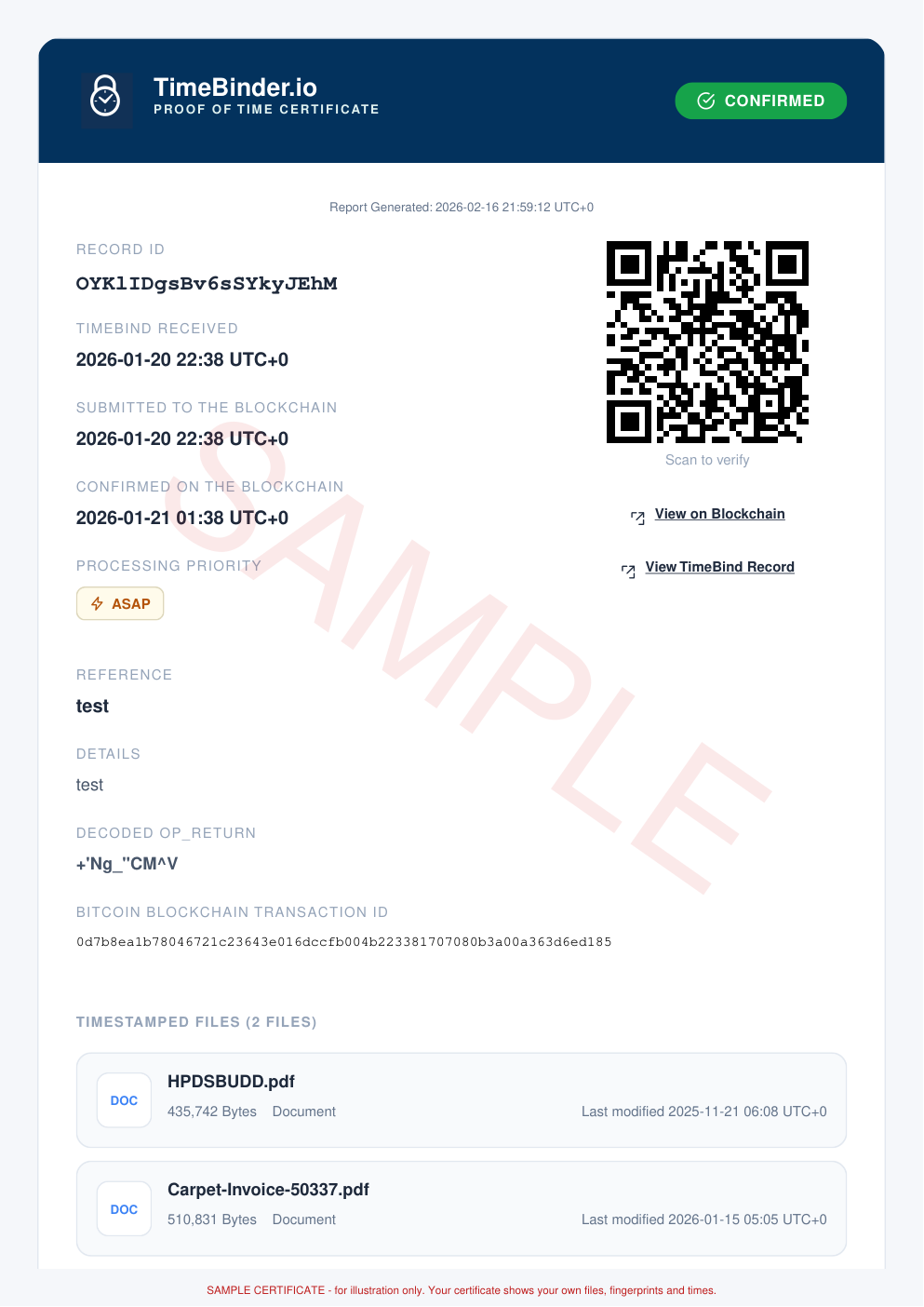
On the Proof of Time Certificate:
- the exact time anchored on the Bitcoin blockchain
- the Bitcoin transaction reference (TXID)
- the TimeBind bundle’s Merkle root, which represents up to 10 file hashes plus any optional reference and detail fields you add
- a QR code and verifier link for checking it
When you check a file and it matches, the verifier shows the timestamp and confirmation depth, the anchor transaction (TXID) and a shareable verifier link you can include with other evidence.
If it doesn’t match, the result is Verification Failed. Usually that means the file was changed or re-saved after it was timestamped. A failed result doesn’t suggest anyone acted dishonestly. It only means this isn’t the file that was sealed.
Which time is the one that counts?
TimeBinder logs several moments: when the fingerprint is submitted to TimeBinder, when it’s sent to the Bitcoin network, when the transaction is mined into a block, and when it has at least 6 confirmations. The one that can be checked cryptographically is the block time. Your file existed no later than that moment. For Pooled, it’s the block time of the shared batch. That’s usually within 24 to 48 hours of submitting (often sooner, depending on Bitcoin network activity), so it can be noticeably later than when you pressed the button.
Pooled, ASAP and the everyday alternative
| Pooled TimeBind | ASAP TimeBind | Emailing the file to yourself | |
|---|---|---|---|
| Cost | 1 Token (the Free plan’s monthly Token, or US$5 on its own) | 3 Tokens (US$15 on its own) | Free |
| When it’s recorded | Usually within 24 to 48 hours, and often sooner, depending on Bitcoin network activity | Broadcast straight away; confirmation depends on the network | Immediately, by your email provider |
| What’s recorded | The file’s fingerprint, in a shared Bitcoin entry | The file’s fingerprint, in its own Bitcoin transaction | The file itself, plus sender, recipient and date |
| Who you rely on to check it later | TimeBinder | Nobody in particular: certificate plus the public Bitcoin blockchain | Your email provider and its records |
| Shows which account sent it | No | No | Yes, it shows the sending address |
| Your file leaves your device | No | No | Yes |
| Extra setup | Sign up | Sign up, and Tokens | None |
Email wins on cost, speed and familiarity, and it records a sender. A TimeBind adds a record of the exact file that doesn’t depend on a mailbox you control, and the file stays private. We compare the two in more detail in emailing yourself as proof.
What a TimeBind shows, and what it doesn’t
What it shows
- That this exact file existed no later than the time recorded on the Bitcoin blockchain
- That a file shown later still matches its fingerprint: the same file gives the same fingerprint, and any edit gives a different one
- A record kept outside your own systems: an ASAP TimeBind can be checked on the Bitcoin blockchain without relying on TimeBinder, and a Pooled TimeBind is verified through TimeBinder
What it doesn’t show
- It doesn’t show who made the file, or who owns it.
- It doesn’t show the contents are true or accurate, or whether AI was used.
- It doesn’t stop anyone copying or changing a file. It only shows whether a file still matches its fingerprint.
- It can’t say how a court, insurer, client or anyone else will treat it.
- A Pooled TimeBind can’t be checked without TimeBinder.
Pooled TimeBinds are verified through TimeBinder. ASAP TimeBinds can also be verified independently, from the certificate and the public Bitcoin blockchain. Checking is always free.
When TimeBinder isn’t the right tool
- You need to show who someone is, or who signed. A timestamp says nothing about identity. A witness, a Justice of the Peace or an e-signature service does that job. See JP certified copy vs a timestamp and DocuSign certificate of completion vs a timestamp.
- You need a standards-based trusted timestamp inside a signed PDF or a regulated workflow. That’s usually RFC 3161. See RFC 3161 vs a blockchain timestamp.
- You’re comfortable with command-line tools and want a free, open-source option. OpenTimestamps may suit you better. See TimeBinder vs OpenTimestamps.
- You won’t keep the exact original file. A TimeBind is checked against the file itself, so if the original is lost or re-saved, the certificate can’t be matched.
- You need a registration or a legal right, such as a trade mark, patent or registered copyright. A timestamp isn’t a registration. See copyright registration vs a timestamp.
Try the fingerprint before you sign up
You can see a file’s SHA-256 fingerprint in your browser with our free SHA-256 file hash checker. Change the file and the code changes. That’s the same check the verifier runs later.
How it works: FAQ
Is my file uploaded?
No. The fingerprint is calculated on your device and only the fingerprint is used. TimeBinder never receives or stores the file.
How long does a TimeBind take?
Pooled is usually recorded within 24 to 48 hours, and often sooner, depending on Bitcoin network activity. ASAP is broadcast straight away, but the Bitcoin network decides when it confirms. The certificate shows the block time that applies.
What if TimeBinder closes?
An ASAP TimeBind can be checked independently, using the certificate’s transaction ID and the public Bitcoin blockchain. A Pooled TimeBind is checked through TimeBinder, because TimeBinder supplies the proof linking your file to the shared entry. If you need a record that doesn’t rely on us, choose ASAP.
Do I need Bitcoin or a crypto wallet?
No. You pay in US dollars by card through Stripe, or use the Free plan’s 1 Token a month. We handle the blockchain side.
Can I choose who checks my TimeBind?
Yes. Make it checkable by anyone with the QR code, or restrict it to email addresses you choose. Either way, they need the file itself to check it, and they never see it through TimeBinder.
What does it cost?
Free: 1 Token a month, no rollover (one Pooled TimeBind). Essential: $20/month for 5 Tokens. Expert: $50/month for 15 Tokens. Or buy Tokens with no plan: 1 for $5, 3 for $15, 9 for $40. All prices are in US dollars.
What does the certificate contain?
The file names, each file’s SHA-256 fingerprint, the recorded time and the details needed to check the record later, including the Bitcoin transaction ID, a QR code and a verifier link. There’s a sample in “What the certificate shows” above.
Related guides
- ASAP vs Pooled verificationWhich TimeBind type to choose
- How blockchain file verification worksChecking a TimeBinder certificate
- SHA-256 file hash checkerSee a file’s fingerprint in your browser
- TimeBinder vs OriginStampSelf-serve app vs API-first service
- Timestamping for freelancersA weekly routine for client work
- Timestamping business documentsQuotes, contracts and policies for small businesses
- Example scenariosSee illustrative examples by industry
Try it on one file.
The Free plan’s 1 Token a month (no rollover) covers one Pooled TimeBind of up to 10 files, and your files never leave your device.
- Open plans and pricing and choose a plan. The Free plan is $0.
- Sign in, then add your files. They stay on your computer.
- Seal them and download your Proof of Time certificates.
Start free: your first Pooled TimeBind each month costs nothing. See pricing